













WhatsApp Shiprocket Integration for Automated Notifications
Send timely shipping alerts to your customers on WhatsApp to keep them updated regarding their order delivery status.

Why WhatsApp Shiprocket Integration
Real-time Shipping Updates
Keep your clients on loop without them asking for it. Automatically notify them using WhatsApp at every milestone, from order pickup and transit process to the final delivery attempt.
Direct Delivery Tracking Links
Reduce friction in the post-purchase journey by sharing live and clickable tracking links within WhatsApp chat. It enables customers to check their shipment status with just a click.
Instant Delivery Confirmation
Provide peace of mind the moment an order reaches its destination. Send automated confirmation messages as soon as Shiprocket marks an order as delivered to make sure it reaches the right person.
Proactive Exception Handling
Convert a potential negative into a positive. In case of any delay, weather disruption, or failed attempts, inform your clients instantly via WhatsApp to manage expectations and maintain trust.
Automated Delivery Reminders
Decrease failed delivery attempts by sending automated reminders and coordination instructions on the delivery day. It ensures customers are available to receive their packages.
Unified Multi-Courier Support
Be it a Delhivery, BlueDart, or Ecom Express through Shiprocket, HelloBotz delivers a unified brand experience. Monitor and notify about packages across all courier partners from a single WhatsApp API dashboard.
Decreased Support Queries
Proactively updating customers can lower "Where is my order?" (WISMO) tickets by up to 70%.
Branded Experience
Use your own brand name and personalized templates to make the conversation feel more professional and trustworthy.
Reduced RTO (Return to Origin)
Sending automated COD (Cash on Delivery) confirmations and address verification prompts via WhatsApp ensures the customer is genuine about the order before you ship it.
How to Integrate HelloBotz WhatsApp API in Shiprocket
Generate Webhook URL
We'll use a webhook to bridge the gap between Shiprocket and Shopify. Go to the integration tab, select Shiprocket, and copy the webhook URL.
Enquiry Now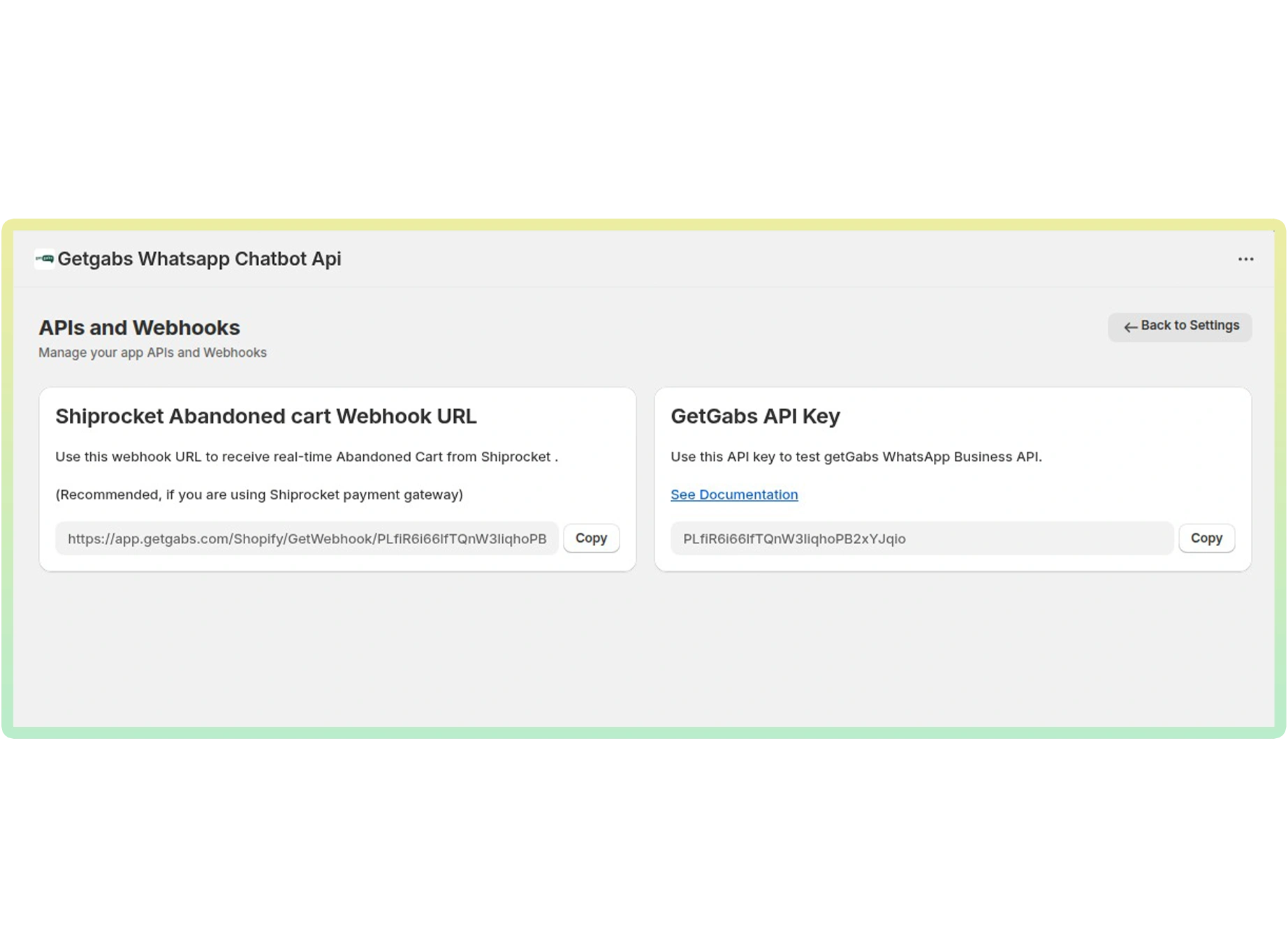
Configure Shiprocket Panel
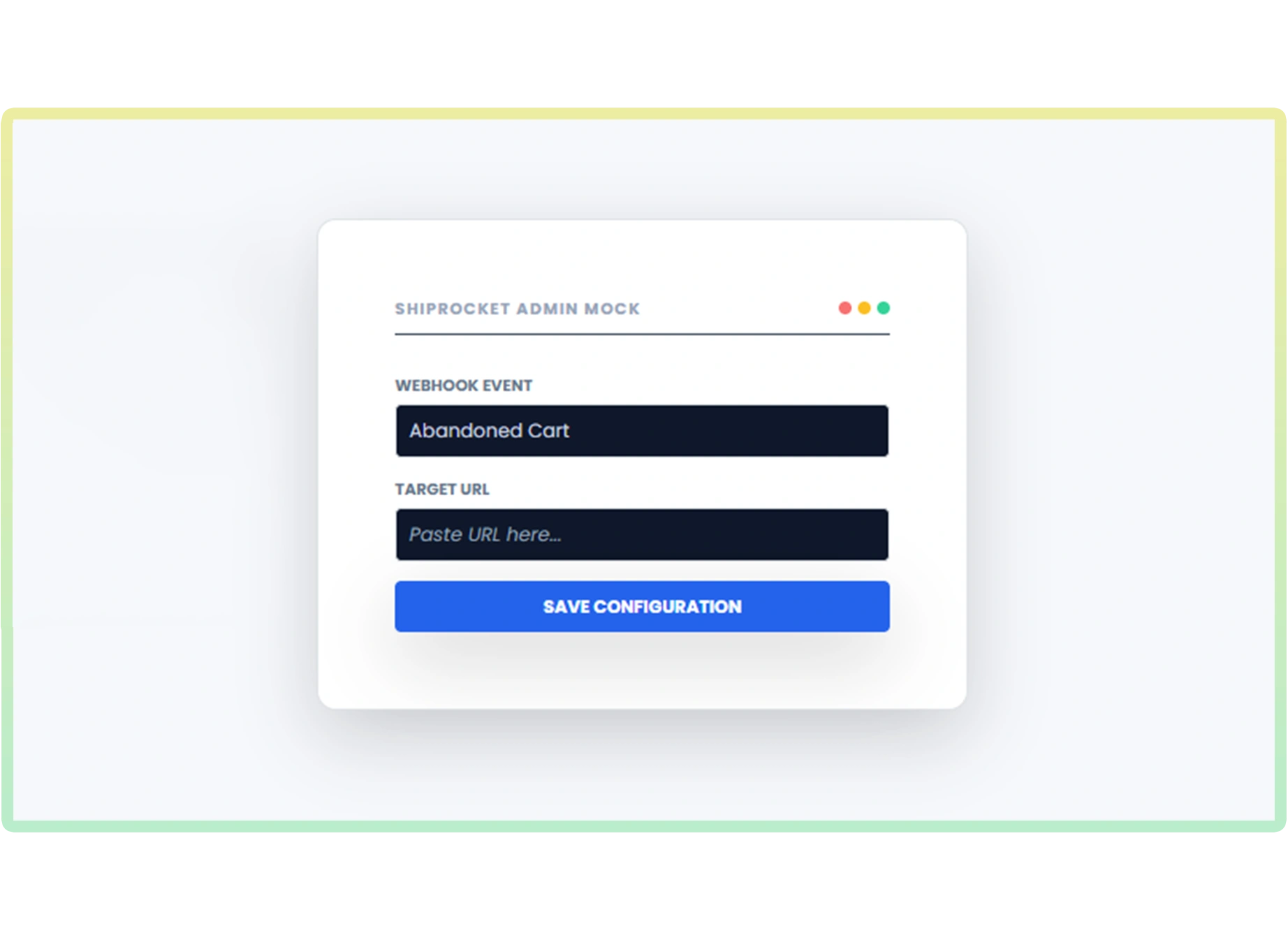
- Log in to Shiprocket > Settings > API > Webhooks.
- Create a new Webhook and paste the URL copied above.
- Set the Event Trigger to "Order Created" or "Cart Abandoned"
Activate HelloBotz Automation
- Go to Automations in HelloBotz and click 'Create New'
- Select 'Abandoned Checkout' as your primary trigger
- Choose your pre-approved WhatsApp template (e.g., 'Discount Reminder')
- Flip the switch to 'Active' to start recovering sales

Explore More WhatsApp Business API Integrations
Discover all supported integrations and connect WhatsApp with your favorite platforms to automate conversations and workflows.
 Shopify
 WooCommerce
 Gotab
Gotab
 Wortal
 Shiprocket
 Zoho
Zoho
 Google Sheet
 n8n
Shopify
WooCommerce
Gotab
Wortal
Shiprocket
Zoho
Google Sheet
n8n
Shopify
WooCommerce
Gotab
Wortal
Shiprocket
Zoho
Google Sheet
n8n
Shopify
WooCommerce
Gotab
Wortal
Shiprocket
Zoho
Google Sheet
n8n
n8n
Shopify
WooCommerce
Gotab
Wortal
Shiprocket
Zoho
Google Sheet
n8n
Shopify
WooCommerce
Gotab
Wortal
Shiprocket
Zoho
Google Sheet
n8n
Shopify
WooCommerce
Gotab
Wortal
Shiprocket
Zoho
Google Sheet
n8n
Department Wise Uses of WhatsApp Official API
See how WhatsApp Business Platform helps businesses boost marketing, streamline sales, and improve customer support.
WhatsApp for Marketing
Reach customers instantly with high-engagement broadcasts and personalized offers.
Learn moreWhatsApp for Sales
Convert chats into sales with automated workflows, lead management, and fast follow-ups.
Learn moreWhatsApp for Support
Provide fast, reliable customer support with instant replies and automated ticket management.
Learn more