



- Capture search intent at the exact moment of demand by routing Google Search ad clicks directly into live WhatsApp chats.
- Reduce customer drop-off by up to 60% compared to traditional multi-step landing page lead capture forms.
- Configure Google Ads call and message assets with automated WhatsApp pre-filled text prompts for instant qualification.
- HelloBotz AI chatbots greet every Google Ads lead in under 3 seconds, qualify requirements, and schedule demos automatically.
Why Google Ads + WhatsApp Is a Winning Combination
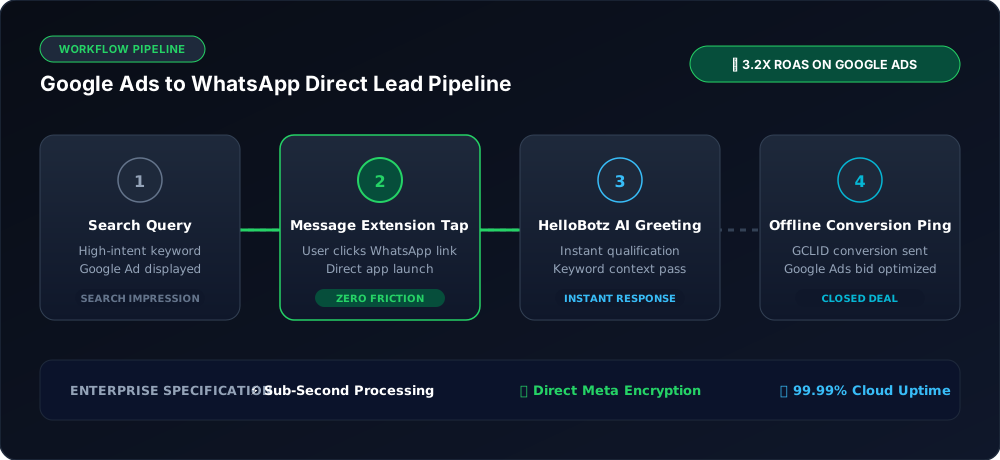
Google Search advertising captures users at the highest point of purchase intent: when they actively search for a solution to their immediate problem (e.g., "emergency plumber near me", "best CRM software for real estate", "buy custom corporate gifts").
However, traditional Google Search ad campaigns route visitors to mobile landing pages with long forms. On mobile devices, conversion rates for standard web forms average just 2% to 4%. Potential buyers drop off due to slow loading times or hesitation to share detailed personal info on a web page.
By connecting Google Ads directly to WhatsApp using Google Message Assets and Click-to-WhatsApp links, brands capture leads instantly. When a prospect clicks your ad, WhatsApp opens immediately on their mobile device, and an automated HelloBotz AI chatbot qualifies their inquiry in real time.
How to Set Up Click-to-WhatsApp on Google Ads
- Create Message Assets in Google Ads: In your Google Ads dashboard, navigate to Assets > Message Assets. Enter your business name and official WhatsApp Business phone number.
- Configure Pre-Populated Intent Text: Write a pre-filled user message such as: "Hi, I saw your Google ad and would like to learn more about pricing."
- Automate Immediate AI Greeting: In HelloBotz, configure an automated chatbot flow that recognizes incoming traffic from Google Ads, greets the prospect in under two seconds, and gathers key project requirements.
- Track Offline Conversions: Pass converted WhatsApp lead data back to Google Ads via Google Click Identifier (GCLID) and offline conversion tracking to train Google's bidding algorithm for maximum ROAS.
Frequently Asked Questions
Pass the Google Click Identifier (GCLID) into your HelloBotz CRM contact properties. When a deal closes, send offline conversion data back to Google Ads to improve smart bidding.
Google charges your standard Cost-Per-Click (CPC) when a user taps your message asset or ad link, exactly like any other search ad click. Once the user enters WhatsApp, you communicate directly without paying additional web hosting fees.
Yes. You can include WhatsApp direct links as sitelink assets or final URL destinations across Search, Display, and Performance Max campaign formats.
Convert High-Intent Google Searchers on WhatsApp
Route Google Ads traffic straight into automated revenue conversations with HelloBotz.