





- Click-to-WhatsApp ads cut lead drop-off by up to 65% by replacing slow multi-field landing page forms with instant conversational chat.
- Meta's 72-hour free messaging window for CTWA ads allows businesses to nurture leads without incurring Meta conversation fees.
- Automated HelloBotz chatbots greet incoming ad traffic in under 2 seconds, qualify intent, collect contact data, and book calendar appointments.
- Connecting offline CRM conversions back to Meta Ads Manager trains Meta's algorithm to optimize for high-value paying customers.
What Are Click-to-WhatsApp (CTWA) Ads and Why Do They Outperform Landing Pages?
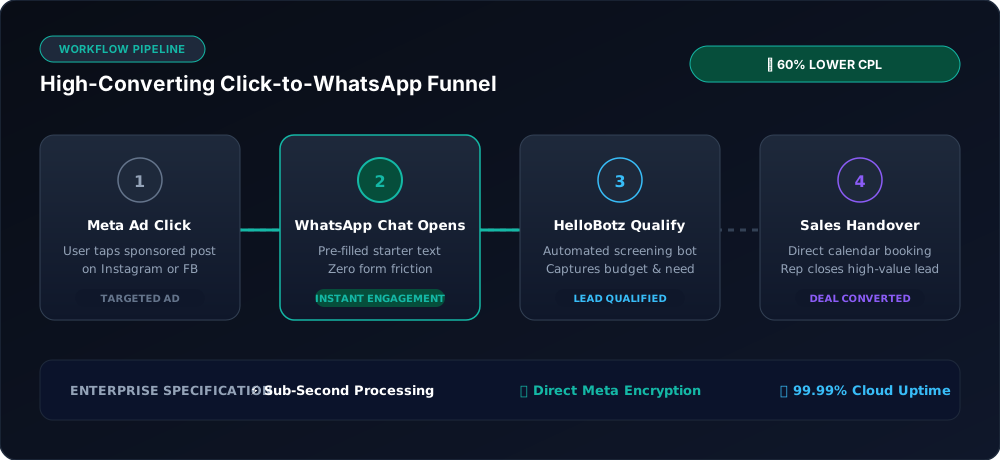
Traditional digital advertising funnels suffer from high drop-off at every stage. A prospect clicks an ad on Instagram or Facebook, waits 3 to 6 seconds for an external web page to load, faces cookie consent banners, navigates a complex layout, and is finally asked to fill out an 8-field lead capture form. On mobile devices, over 70% of potential leads bounce before ever hitting the submit button.
Click-to-WhatsApp (CTWA) ads eliminate this friction entirely. When an interested user taps your ad creative on Facebook Feeds, Instagram Reels, or Stories, Meta immediately opens WhatsApp on their phone with a pre-filled message prompt. There is no website loading latency, no broken forms, and no forgotten follow-ups.
Even more compelling for marketers: Meta provides a 72-hour free messaging window for all conversations initiated through Click-to-WhatsApp ads. During these three days, your business can exchange unlimited messages and media with the prospect without paying Meta conversation charges.
Step-by-Step Tutorial: Setting Up CTWA Ads in Meta Ads Manager
Step 1: Choose the 'Engagement' Campaign Objective
Log in to Meta Ads Manager and create a new campaign. Select Engagement as your primary campaign objective. At the Ad Set level, select Messaging Apps as the conversion location, and select WhatsApp as your primary destination.
Step 2: Link Your Verified WhatsApp Business API Number
Ensure your ad account is linked to your official WhatsApp Business account registered with HelloBotz. Linking a verified API number rather than a personal phone ensures unlimited concurrent chat handling and automated chatbot activation.
Step 3: Define High-Intent Audience Targeting
Target based on specific interests, behaviors, or upload a Lookalike Audience derived from your existing high-value customer database. Because WhatsApp is a mobile-first experience, optimize your placements for Mobile Devices across Instagram Reels, Facebook Feed, and Instagram Stories.
Step 4: Craft Creative Copy & Pre-Filled Conversation Starters
Under the Ad Creative settings, write persuasive copy that clearly communicates what happens when the user clicks. In the Message Template section, configure pre-filled conversation prompts such as: "Hi, I want to learn more about the 2026 growth package" or "I'd like to check product pricing." This makes it effortless for the user to initiate the chat with a single tap.
Step 5: Connect an Automated HelloBotz AI Flow for Instant Qualification
Never leave incoming ad leads waiting for a manual sales rep. In your HelloBotz dashboard, set up a trigger on the specific ad source ID. The moment the user sends the pre-filled starter, HelloBotz responds in under two seconds: welcoming the user by name, presenting interactive qualification buttons, collecting requirements, and offering an instant calendar booking link.
Traditional Landing Page vs. Click-to-WhatsApp Funnel
| Stage | Traditional Landing Page Funnel | Click-to-WhatsApp Funnel |
|---|---|---|
| Initial Click | Opens external mobile web browser | Opens native WhatsApp application |
| Load Latency | 3 – 8 seconds (High bounce risk) | 0.2 seconds (Instant app launch) |
| Lead Capture | Manual form filling (Name, Email, Phone) | Instant: Verified phone number received on first chat |
| Follow-up Speed | Hours or days later via cold email/call | Immediate (under 2 seconds via AI bot) |
| Meta Conversation Cost | N/A | 100% Free for 72 Hours |
Frequently Asked Questions
Include an enticing offer in the pre-filled message (e.g., 'Hi, I want the 20% discount code') so users immediately hit send upon launching the chat.
When a customer initiates a chat by clicking your Click-to-WhatsApp ad, Meta opens a 72-hour free window. Unlike standard 24-hour windows, this extended window incurs zero Meta conversation charges, and businesses can send promotional marketing messages without paying per-conversation fees.
Yes. HelloBotz captures Meta ad referral data including Ad ID, Campaign ID, and Headline. This information is automatically attached to the customer's CRM profile, allowing you to track return on ad spend (ROAS) and optimize high-performing creatives.
Absolutely. HelloBotz features seamless bot-to-human handover. Whenever a lead indicates high purchasing intent or requests a human agent, the bot automatically pauses and notifies assigned reps in the shared team inbox.
Supercharge Your Meta Ad Campaigns with HelloBotz
Convert ad clicks into qualified pipeline leads in real time. Take advantage of Meta's 72-hour free messaging window today.