












- Meta Cloud API allows businesses to send high-volume transactional notifications and marketing messages programmatically via standard REST endpoints.
- Pre-approved Meta templates ensure strict message delivery, end-to-end encryption, and 99.99% uptime reliability.
- Session messages sent within the 24-hour customer service window allow free-form text, media, and interactive components without template restrictions.
- HelloBotz simplifies API complexity by providing ready-made webhook listeners, token provisioning, and visual template management.
Understanding the WhatsApp Cloud API Architecture
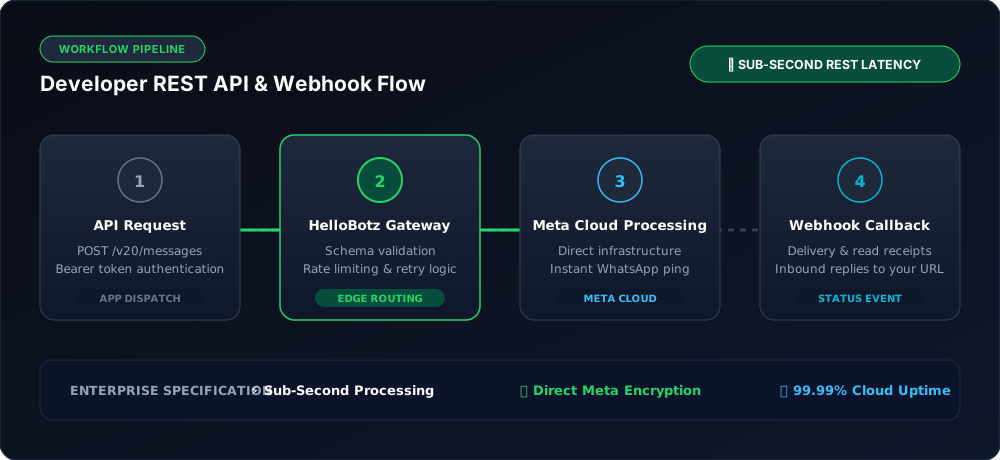
The Meta WhatsApp Cloud API provides direct programmatic access to WhatsApp core messaging servers. Instead of hosting complex on-premises Docker containers, developers can interact with standard HTTPS REST endpoints hosted in Meta's global data centers.
When sending messages through the API, it is essential to understand the two core message classifications established by Meta:
- Template Messages (Business-Initiated): Used to initiate conversations outside the 24-hour service window. Must be submitted and pre-approved by Meta under Marketing, Utility, or Authentication categories.
- Session Messages (Customer-Initiated): When a user messages your business first, a 24-hour conversational window opens. During this window, your business can exchange free-form text, audio, images, documents, and interactive buttons without pre-approved templates.
Step-by-Step: Sending Your First Cloud API Message
Step 1: Set Up Meta Business Manager and Developer App
Create an application in the Meta for Developers portal, add the WhatsApp product, and associate your Meta Business Manager account. Generate a System User permanent access token with whatsapp_business_messaging permissions.
Step 2: Submit a Message Template
In the WhatsApp Manager, create a template (e.g., order_update) with dynamic variable placeholders like {{1}} for customer name and {{2}} for order status.
Step 3: Dispatch an HTTPS POST Request
Send an authenticated POST request to Meta's Graph API endpoint (https://graph.facebook.com/v21.0/{phone_number_id}/messages) with a JSON payload specifying recipient number, template name, and dynamic component values.
Sample API Payload (JSON)
{
  "messaging_product": "whatsapp",
  "to": "+15551234567",
  "type": "template",
  "template": {
    "name": "shipping_confirmation",
    "language": { "code": "en_US" },
    "components": [
      {
        "type": "body",
        "parameters": [
          { "type": "text", "text": "Alexander" },
          { "type": "text", "text": "ORD-9842" }
        ]
      }
    ]
  }
}
Frequently Asked Questions
Always return an immediate HTTP 200 OK response upon receiving Meta webhooks before processing the payload asynchronously in background queues to prevent timeout drops.
Standard WhatsApp Cloud API accounts start at 80 messages per second (MPS), which can be scaled up to 500 MPS upon request to Meta for high-volume enterprise broadcasting.
If you build directly, you must host an HTTPS server with a publicly accessible webhook endpoint. With HelloBotz, all webhook handling, database logging, and message routing are managed automatically.
Skip the Coding: Use HelloBotz WhatsApp API Engine
Start sending official WhatsApp Business API messages in minutes without complex server setups.