












- Proactive WhatsApp delivery alerts achieve an average 98% open rate, compared to just 18-22% for conventional transactional emails.
- Automated order milestone messaging drastically reduces 'Where Is My Order?' (WISMO) support inquiries, saving hours of manual agent labor.
- Meta Utility conversation categories allow low-cost, instant message delivery for order tracking, dispatch notices, and out-for-delivery alerts.
- HelloBotz integrates directly with Shopify, WooCommerce, Shiprocket, and custom ERP webhooks to trigger milestone messages with zero delay.
Why Post-Purchase Tracking via WhatsApp Outperforms Traditional SMS & Email
In modern e-commerce, the customer experience does not end at checkout—it truly begins the moment an order is confirmed. For years, direct-to-consumer (D2C) brands relied on email confirmations and basic 160-character SMS text messages to keep buyers informed. However, changing consumer behaviors and inbox saturation have rendered these channels increasingly inefficient.
Transactional emails frequently land in promotional tabs or spam folders, leading to anxious shoppers repeatedly contacting support desks asking "Where is my order?" (WISMO). Traditional SMS messages, on the other hand, lack interactive branding, cannot display dynamic clickable buttons, and offer zero two-way conversational capability.
By shifting delivery notifications to the official WhatsApp Business API, brands meet customers on the application they check dozens of times each day. With instant read receipts, end-to-end encryption, and rich media support, WhatsApp transforms post-purchase communication into a seamless, reassuring customer touchpoint.
The Anatomy of a High-Converting WhatsApp Delivery Flow
An effective post-purchase communication sequence consists of multiple strategic touchpoints designed to build trust, provide real-time clarity, and anticipate customer needs:
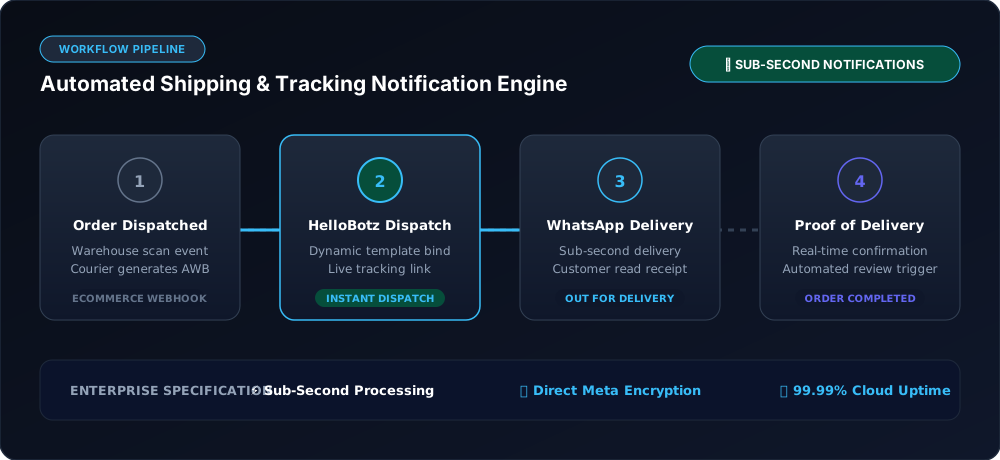
- 1. Instant Order Confirmation: Triggered immediately upon successful checkout. Summarizes purchased items, order ID, total amount paid, and shipping destination.
- 2. Dispatch & Tracking Alert: Sent when the warehouse assigns an Air Waybill (AWB) or tracking number. Includes a 1-click CTA button directing the customer to a live tracking portal.
- 3. Out-for-Delivery Notification: Sent on the morning of scheduled delivery. Informs the recipient to remain available, specifies payment due (for COD orders), and offers an interactive button to reschedule if needed.
- 4. Proof-of-Delivery Confirmation: Confirms the package has reached the recipient's doorstep and invites immediate product feedback or customer satisfaction ratings.
- 5. Automated NDR (Non-Delivery Report) Recovery: If courier delivery fails due to customer unavailability or address ambiguity, a message is triggered allowing the buyer to update address details with a tap.
Step-by-Step Implementation: Automating WhatsApp Alerts with HelloBotz
Setting up automated shipping alerts does not require extensive engineering resources. Using HelloBotz native integrations and visual flow engine, stores can go live in under twenty minutes:
Step 1: Connect Your E-Commerce Store or Courier Gateway
Navigate to the HelloBotz Integrations Hub and connect your store platform (Shopify, WooCommerce, Magento) or logistics aggregator (Shiprocket, Delhivery, BlueDart, Shadowfax). Authentication is completed securely via API keys or 1-click OAuth.
Step 2: Submit Meta Utility Message Templates
Because order notifications are transactional, they qualify for Meta's Utility Category. Utility templates benefit from near-instant Meta review, higher delivery priority, and the most affordable per-conversation rates. A typical template incorporates dynamic parameters such as {{1}} for customer name, {{2}} for order number, and {{3}} for the live tracking link.
Step 3: Configure Event-Driven Webhook Triggers
In your HelloBotz automation dashboard, map each store or shipping event to its corresponding approved template. For example, when Shopify fires the fulfillments/create webhook, HelloBotz immediately dispatches the dispatch notification containing the courier name and live tracking button.
Delivery Channel Comparison: WhatsApp vs. Email vs. SMS
| Metric / Feature | WhatsApp Business API | Transactional Email | Legacy SMS |
|---|---|---|---|
| Average Open Rate | 98% (within 10 mins) | 18% – 22% | 65% – 75% |
| Click-Through Rate (CTR) | 45% – 60% | 2.5% – 3.5% | 8% – 12% |
| Interactive Buttons & Links | Yes (Native Quick Reply & CTA) | Yes (Hyperlinks) | Raw URLs only (High spam flag risk) |
| Two-Way Support Handshake | Yes (Instant AI or human response) | Slow (No-reply addresses common) | No (One-way only) |
| Fraud & Phishing Protection | High (Verified Official Green Tick) | Low (Frequent spoofing) | Low (Sender ID spoofing) |
Frequently Asked Questions
Include interactive Quick Reply buttons like 'Track Package' and 'Change Delivery Time' directly inside your WhatsApp shipping template to reduce failed delivery attempts by over 30%.
No. By using pre-approved Meta Utility message templates, businesses can initiate delivery notifications at any time, even outside the standard 24-hour customer care window, ensuring buyers receive updates regardless of when they last interacted with your business.
Yes! Unlike static SMS alerts, WhatsApp is inherently conversational. If a customer replies to ask a question, HelloBotz AI chatbot can answer instantly, or seamlessly route the conversation to an available agent in your shared team inbox.
By notifying buyers on the morning of delivery and offering 1-click confirmation buttons, customers ensure they have cash ready (for COD) or are present at home. If delivery fails, HelloBotz automatically contacts the customer to verify address details, allowing couriers to reattempt successfully and preventing costly returns.
Automate Your Delivery Workflows with HelloBotz
Connect your Shopify, WooCommerce, or Shiprocket store to official Meta WhatsApp Business API in minutes. Eliminate WISMO tickets and delight your customers.